
If you run a WooCommerce store selling physical products, relying solely on single-unit retail pricing leaves significant revenue on the table. Bulk buyers, corporate clients, and wholesale accounts rarely purchase one or two items at a time. They order in dozens, cartons, or pallets, and they expect price breaks that reward their volume.
Tiered pricing (also known as quantity-based or volume pricing) is the most effective way to encourage higher order volumes without cutting your margins on retail sales. Instead of charging a flat price regardless of basket size, you offer structured discounts as order quantities increase.
In this guide, we will walk through how to configure tiered pricing and quantity discounts in WooCommerce, covering flat wholesale pricing with minimum order quantities, dynamic volume tiers, and role-specific volume discounts.
Understanding WooCommerce Pricing Models
Before configuring discount rules, it helps to understand the three primary pricing structures available for WooCommerce stores:
| Pricing Model | How It Works | Best Use Case |
|---|---|---|
| Standard Retail | Fixed price per unit, regardless of order quantity. | Individual B2C consumers buying 1 to 3 items. |
| Flat Wholesale with MOQ | Discounted flat price that only unlocks once a Minimum Order Quantity is reached. | Standard B2B accounts buying in full carton multiples. |
| Dynamic Tiered Pricing (Pro) | Sliding price scale where unit cost decreases across multiple volume breaks (e.g. 10-24, 25-49, 50+). | Incentivizing buyers to add more units to reach the next discount threshold. |
Step 1: Setting Minimum Order Quantities (MOQ)
The foundation of B2B pricing is setting a baseline wholesale price coupled with a Minimum Order Quantity (MOQ). This prevents buyers from purchasing single items at wholesale rates while ensuring every wholesale order meets your profitability threshold.
For instance, if a retail product sells for 0.00, you can set the baseline wholesale rate to 0.00 with a minimum order requirement of 10 units. Retail shoppers continue paying 0.00 each with no quantity restrictions, while wholesale buyers must purchase at least 10 units to receive the 0.00 unit price.
Step 2: Configuring Dynamic Volume Tiers (Pro)
While a single MOQ establishes the entry threshold, dynamic tiered volume discounts encourage wholesale buyers to place significantly larger orders. When a customer sees that ordering 25 units drops the unit price from 0.00 to 2.50, they are naturally incentivized to increase their cart size.
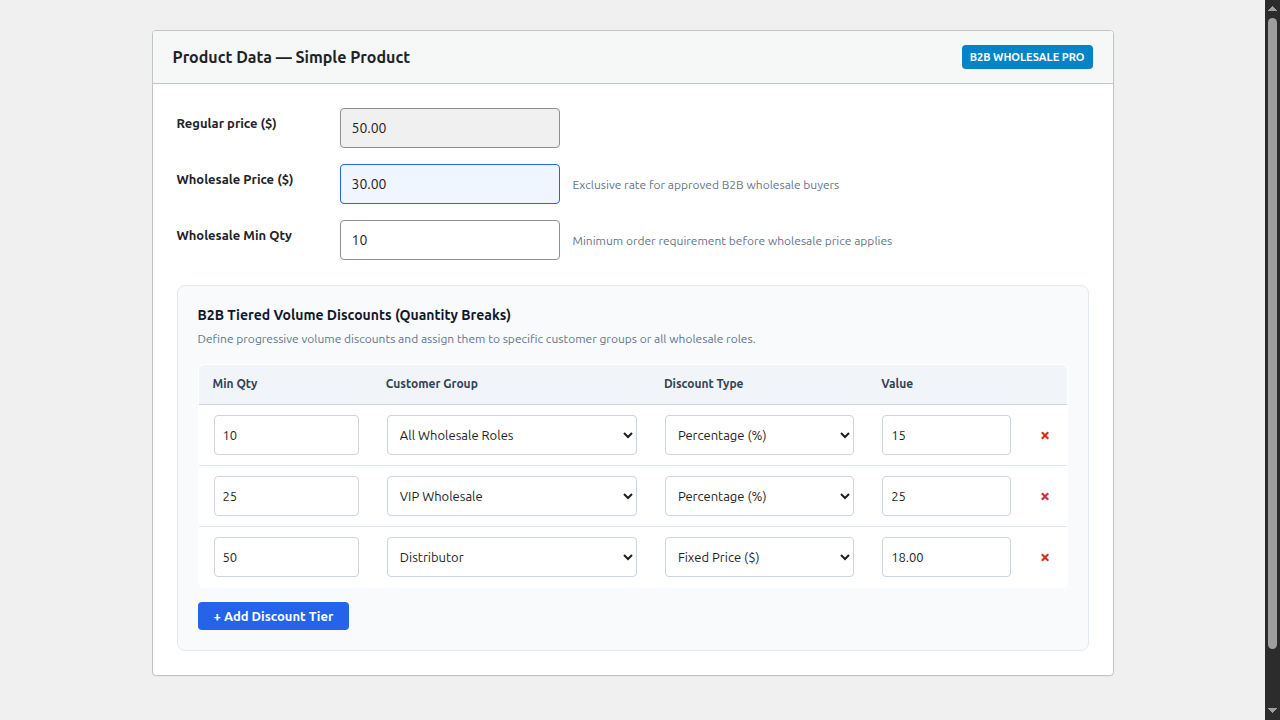
With NBKB B2B Wholesale Pro, you can configure unlimited volume breaks directly inside the WooCommerce Product Data panel:
- Open the product in Products > All Products.
- In the Product Data meta box, locate the B2B Tiered Volume Discounts section.
- Click + Add Discount Tier to define your volume breaks:
- Tier 1: Min Qty 10 → 15% discount (5.50 / unit) for All Wholesale Roles.
- Tier 2: Min Qty 25 → 25% discount (2.50 / unit) for VIP Wholesale.
- Tier 3: Min Qty 50 → Fixed Price of 8.00 / unit for Distributor accounts.
- Click Update to save the product.
Step 3: Frontend Interactive Tier Table
On the product page, an interactive volume discount table automatically appears for logged-in wholesale buyers. The table clearly outlines the quantity ranges, discount percentages, and final unit prices.
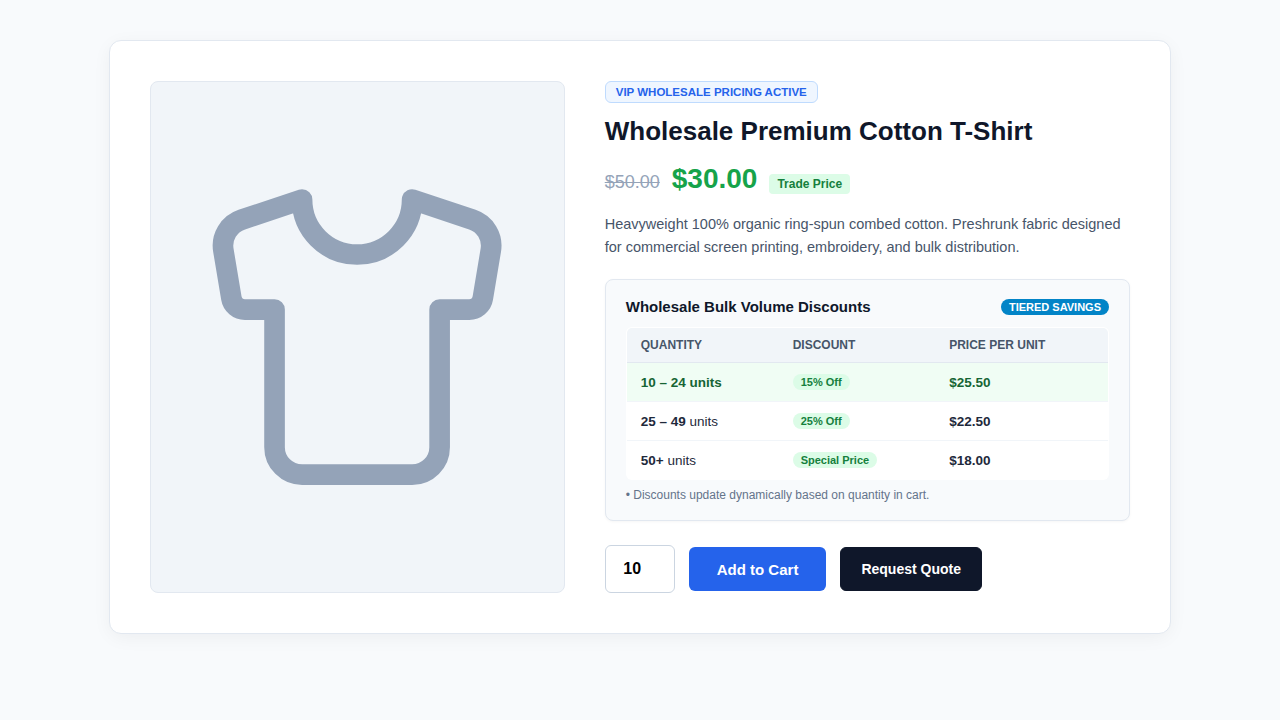
As the buyer adjusts the quantity field, the matching tier row dynamically highlights in green (.nbkb-active-tier), giving immediate visual feedback before they click Add to Cart or Request Quote.
Step 4: Role-Specific Tier Resolution & Precedence
Not all wholesale buyers should receive the same volume breaks. A high-volume distributor purchasing 500 units monthly deserves deeper discounts than a local boutique buying 25 units once a quarter.
The Pro pricing engine handles this with intelligent role precedence:
- Role-Specific Priority: If a buyer is assigned to the VIP Wholesale role, the engine checks for tiers specifically assigned to VIP Wholesale. If found, the VIP structure is applied.
- Seamless Fallback: If no custom tiers are defined for a user’s specific role, the engine automatically falls back to the generic All Wholesale Roles tier table.
- Guest Protection: Unauthenticated guests and retail customers only see standard retail pricing, keeping your trade volume agreements confidential.
Step 5: Variable Products and Variation-Specific Tiers
If your catalog includes variable products (such as apparel with multiple sizes or industrial goods with different specifications), the Pro add-on provides two flexible approaches:
- Parent Tier Inheritance: Define volume tiers once at the parent product level. Every variation (Small, Medium, Large) automatically inherits the same volume breaks.
- Variation-Specific Tiers: For items where different variations carry significantly different manufacturing costs (such as 1-liter vs 5-liter containers), you can configure dedicated volume tiers inside each variation row.
Best Practices for WooCommerce Tiered Pricing
To maximize conversions while protecting profitability, keep these best practices in mind:
- Block Retail Coupons for Bulk Orders: Never allow wholesale accounts to apply retail promotional coupons on top of tiered discounts. Enabling the retail coupon blocker in B2B Settings eliminates double discounting.
- Calculate Landed Margins First: Before setting discount percentages at higher tiers (such as 25% or 35%), factor in payment processing fees, shipping costs, and packaging to ensure high-volume orders remain profitable.
- Align Tiers with Packaging Units: If your products ship in boxes of 10 or master cartons of 50, set your quantity tiers to match those multiples (e.g. 10, 25, 50) to streamline warehouse fulfillment.
- Pair with Request a Quote: For orders exceeding your highest tier (e.g. 100+ units), allow buyers to submit a quote request directly from the product page.
Summary
Adding tiered volume pricing to WooCommerce transforms your store into a powerful B2B ordering portal. By combining minimum order quantities with role-specific volume breaks, you give commercial buyers clear incentives to place larger, more frequent orders while keeping your margins fully protected.