By default, WooCommerce classifies every shopper under a single user role: Customer. While that works fine for direct-to-consumer (B2C) stores where every visitor pays standard retail prices, it quickly falls short when you begin selling wholesale (B2B).
In wholesale eCommerce, different buyers operate under different commercial agreements. A local boutique placing small repeat orders might receive a 15% trade discount, while a national distributor ordering in pallet quantities might negotiate a 35% discount. Managing these differences with discount coupon codes is fragile, prone to leakage, and creates administrative overhead.
In this tutorial, we will walk through how to create custom wholesale user roles in WooCommerce, assign catalog-wide percentage discounts per role, and set up a dedicated B2B registration workflow.
The Problem with Default WordPress User Roles
WordPress includes six default user roles: Administrator, Editor, Author, Contributor, Subscriber, and Customer. None of these roles provide wholesale-specific capabilities such as tax exemption, trade pricing visibility, or volume breaks.
| Approach | Pros | Cons |
|---|---|---|
| Coupon Codes | Easy to set up without extra plugins. | Codes get shared online; coupons can stack accidentally; buyers must manually remember codes at checkout. |
| Separate B2B Store | Complete isolation of products and prices. | Double hosting costs, duplicate inventory synchronization, and doubled maintenance. |
| Custom Wholesale Roles (Recommended) | Single store, automated pricing on login, granular role discounts, zero coupon leakage. | Requires a dedicated wholesale role management plugin. |
Step 1: Creating Custom Wholesale Roles
To create custom wholesale roles without writing custom PHP code or installing heavy role editor plugins, we will use the free NBKB B2B Wholesale plugin.
- Go to B2B Wholesale > Wholesale Roles in your WordPress admin menu.
- Under Add New Wholesale Role, enter the details:
- Role Name: The display label for the role (e.g. VIP Wholesale or Distributor).
- Role Key (Slug): A unique machine-readable identifier (e.g.
vip_wholesale). - Storewide Discount (%): An optional global percentage discount applied automatically across your entire catalog.
- Click Create Wholesale Role.
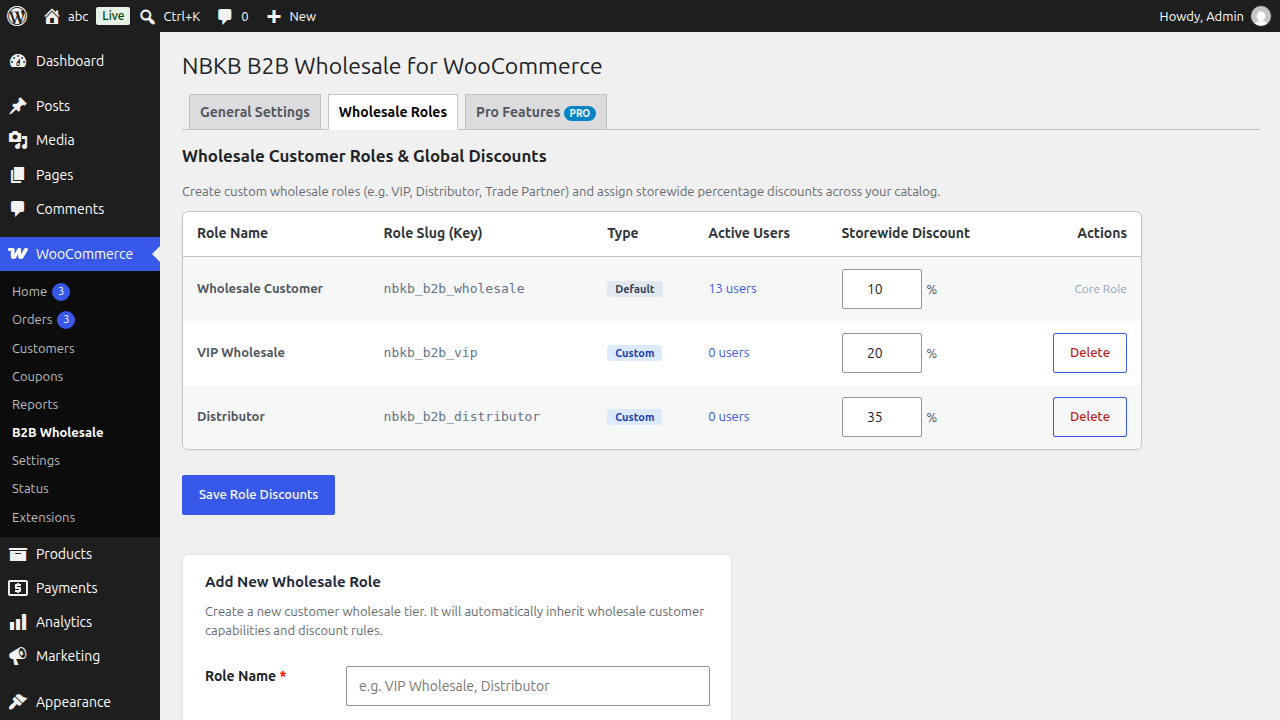
Once created, the new role is registered with WordPress and appears in the standard Users > All Users role dropdown, allowing you to assign any existing customer to that role with one click.
Step 2: Configuring Global Storewide Discounts per Role
One of the biggest advantages of custom wholesale roles is the ability to apply global percentage discounts without manually editing every product in your store.
For example, you can configure a multi-tiered wholesale pricing structure:
- Standard Wholesale (
b2b_wholesale): 15% storewide discount. - VIP Wholesale (
vip_wholesale): 25% storewide discount for high-volume accounts. - Distributor (
distributor): 35% storewide discount for commercial bulk buyers.
How Pricing Precedence Works: If a specific product has a fixed wholesale price entered in its Product Data meta box (e.g. 5.00), that exact price always takes precedence over the global storewide percentage discount. If no fixed wholesale price is set, the global percentage discount applies automatically.
Step 3: Dedicated B2B Wholesale Registration
Retail shoppers and wholesale buyers have completely different onboarding requirements. Retail customers want a fast, frictionless signup with just an email and password. Wholesale accounts, however, require commercial verification such as business name, company registration number, and tax ID.
To set up a dedicated B2B registration page:
- Create a new WordPress page (e.g. Wholesale Registration with slug
/wholesale-registration/). - Add the shortcode block:
- Publish the page.
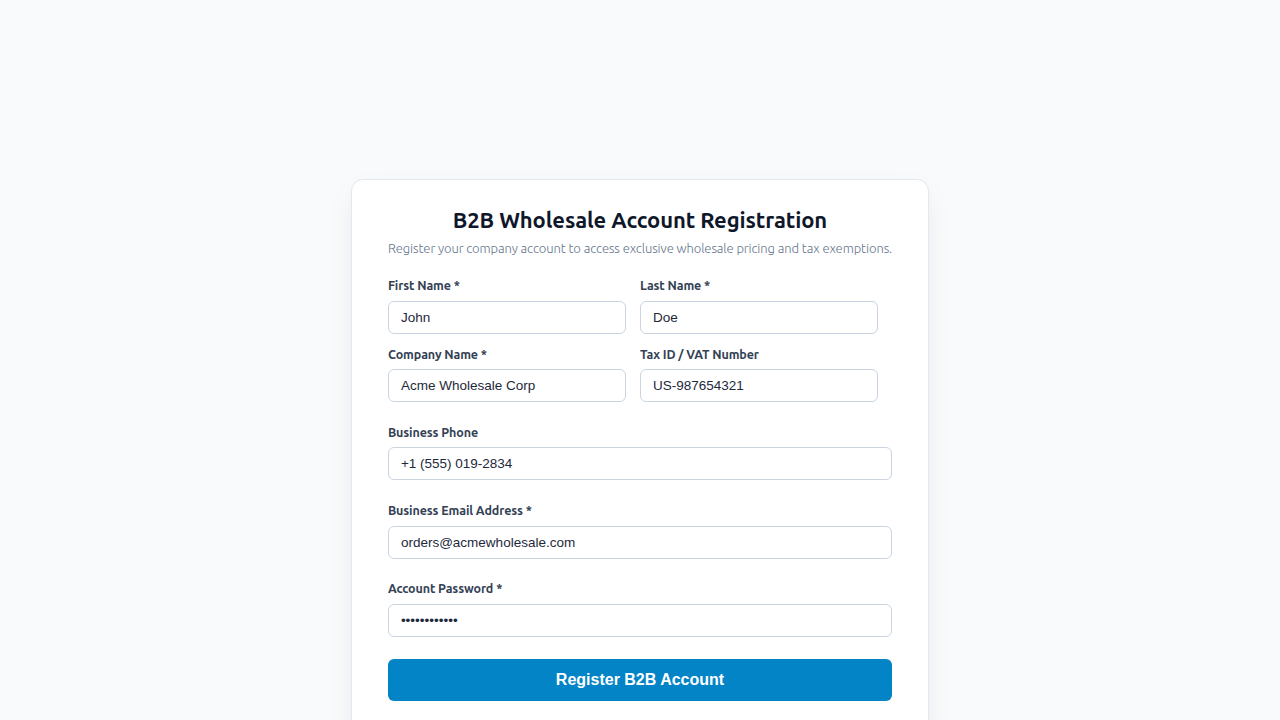
This dedicated form captures essential business details (Company Name, Tax ID / VAT Number, Phone, and Address) and assigns the applicant directly to your designated default wholesale role upon completion.
Step 4: Safe Customer Reassignment on Role Deletion
In many role-management plugins, deleting a custom role leaves existing users in an orphaned state (having no valid role in WordPress), which can break their login access or permissions.
When you delete a custom wholesale role in NBKB B2B Wholesale, the system automatically detects all accounts assigned to that role and safely reassigns them to the default wholesale role. This guarantees that no customer account is ever broken or locked out if you decide to restructure your wholesale tiers.
Step 5: Protecting Margins with Essential B2B Settings
Once your custom roles are active, there are three essential safeguards you should enable under B2B Wholesale > Settings:
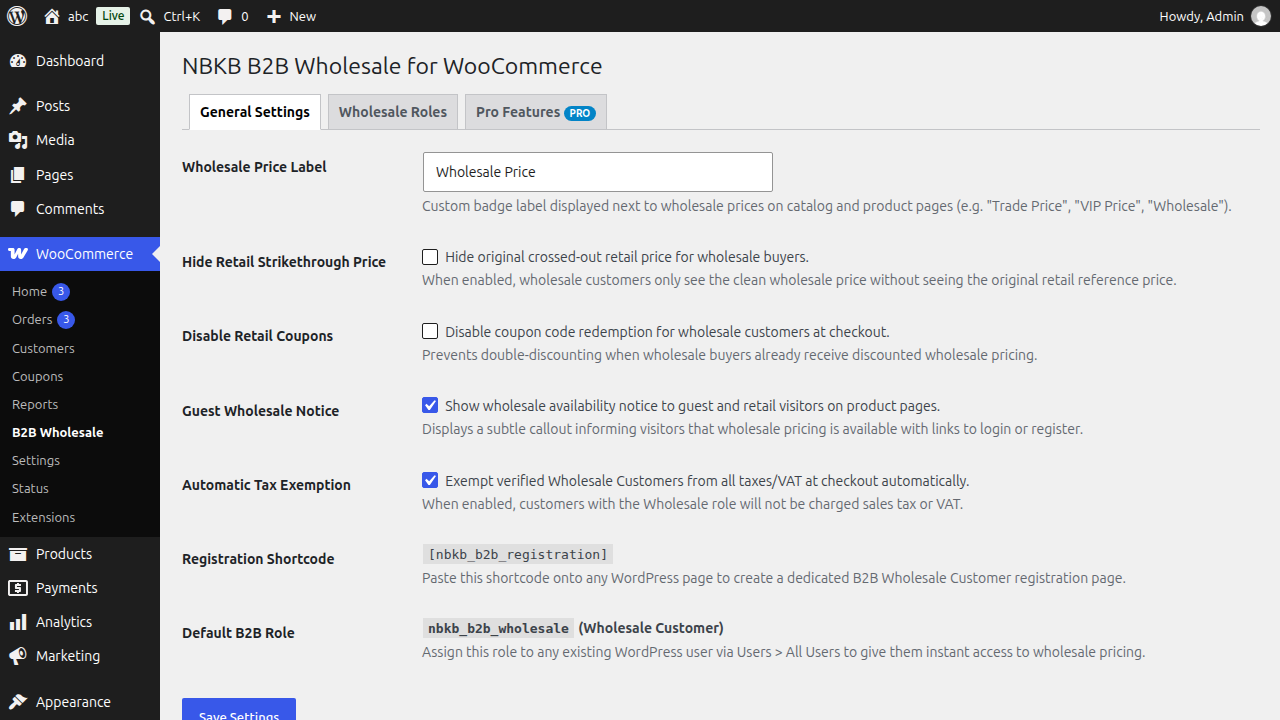
- Retail Coupon Blocker: Enable this toggle to prevent wholesale accounts from applying B2C promotional discount codes on top of their wholesale rates.
- Custom Price Labels: Change the price badge text displayed next to wholesale prices (e.g. “Trade Price”, “VIP Rate”, or “Wholesale Price”) to maintain clear branding.
- Tax Exemption: Enable tax-exempt status for verified commercial accounts that provide a valid resale certificate or tax ID.
Summary
Creating custom wholesale roles in WooCommerce allows you to segment commercial buyers, automate tiered pricing on login, and eliminate the risks of manual coupon management. With structured wholesale roles, your store can easily support retail customers, standard trade accounts, and large distributors from a single, unified WooCommerce dashboard.