NBKB VIP Plus for WooCommerce
1. Overview & Architecture
NBKB VIP Plus for WooCommerce is an automated customer retention and loyalty engine designed to turn one-time shoppers into repeat, loyal brand advocates. Instead of running continuous sitewide discount sales or issuing one-off coupons that eat into your margins, VIP Plus evaluates customer spending behavior and rewards loyal buyers with automated perks.
The suite is built with two modular tiers:
- Core Lite Plugin (
nbkb-vip-plus): The foundational free plugin published on WordPress.org. Manages 365-day rolling spend and completed order milestones, automatic 100% free shipping at checkout, storewide VIP % discounts, dual price catalog badges, customer My Account portal, and transactional celebration emails. - Pro Enterprise Add-on (
nbkb-vip-plus-pro): The monetization extension adding multi-tier VIP progression ladders (Silver, Gold, Platinum, Diamond), direct paid VIP pass digital products, a gamified loyalty coins and wallet engine, and flash sale 24-hour early access lockers.
2. Requirements & Compatibility
| Component | Supported Version | Notes |
|---|---|---|
| WordPress | 6.2 or higher | Tested up to WordPress 7.1 |
| WooCommerce | 7.0 or higher | Tested up to WooCommerce 11.2+ |
| PHP | 7.4 to 8.4+ | Clean, strict PHP code running seamlessly on modern PHP runtimes |
| Order Storage | HPOS & Legacy | 100% High-Performance Order Storage (Custom Order Tables) native |
| Cart & Checkout | Blocks & Classic | Full support for Gutenberg Cart & Checkout blocks and classic shortcodes |
3. Installation & License Setup
Installing Core Lite
- In your WordPress admin dashboard, navigate to Plugins > Add New.
- Search for NBKB VIP Plus for WooCommerce (or upload
nbkb-vip-plus.zip). - Click Install Now, then click Activate.
- You will see a new dedicated VIP Plus Club menu appear in your WordPress admin sidebar.
Installing Pro Enterprise Add-on
- Download the
nbkb-vip-plus-pro.zippackage from your purchase confirmation email or Freemius customer portal. - Go to Plugins > Add New > Upload Plugin and select the zip file.
- Click Activate. Enter your Freemius license key when prompted to unlock 1-click automatic updates.
4. Milestone Qualification Settings
Configure how customers qualify for VIP membership under VIP Plus Club > Settings > VIP Qualification Milestones:
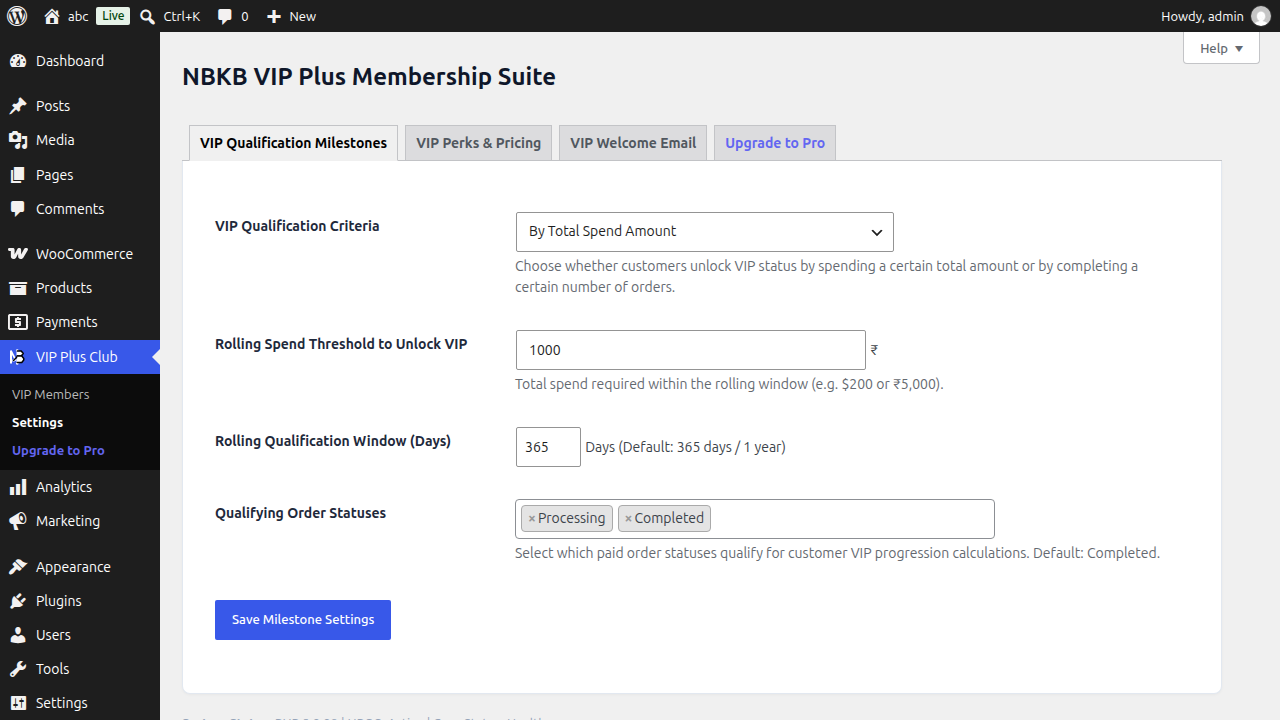
- Qualification Mode: Choose between:
- Total Spend Milestone: Customers qualify when their rolling spend reaches your threshold (e.g., $200 / £200 / €200).
- Order Count Milestone: Customers qualify when they complete a target number of orders (e.g., 5 or 10 orders).
- Whichever Comes First: Customers qualify as soon as they reach either the spend threshold or the order count.
- Rolling Window Duration (Days): Default is
365days. Spend is continuously calculated over a moving window, motivating customers to continue ordering year-round to retain status. - Qualifying Order Statuses: By default, only Completed orders contribute toward milestone spend. You can also include Processing if your fulfillment takes longer.
5. Automatic Free Shipping & Perks
Under VIP Plus Club > Settings > VIP Perks & Pricing, manage the frictionless perks granted to active VIP members:
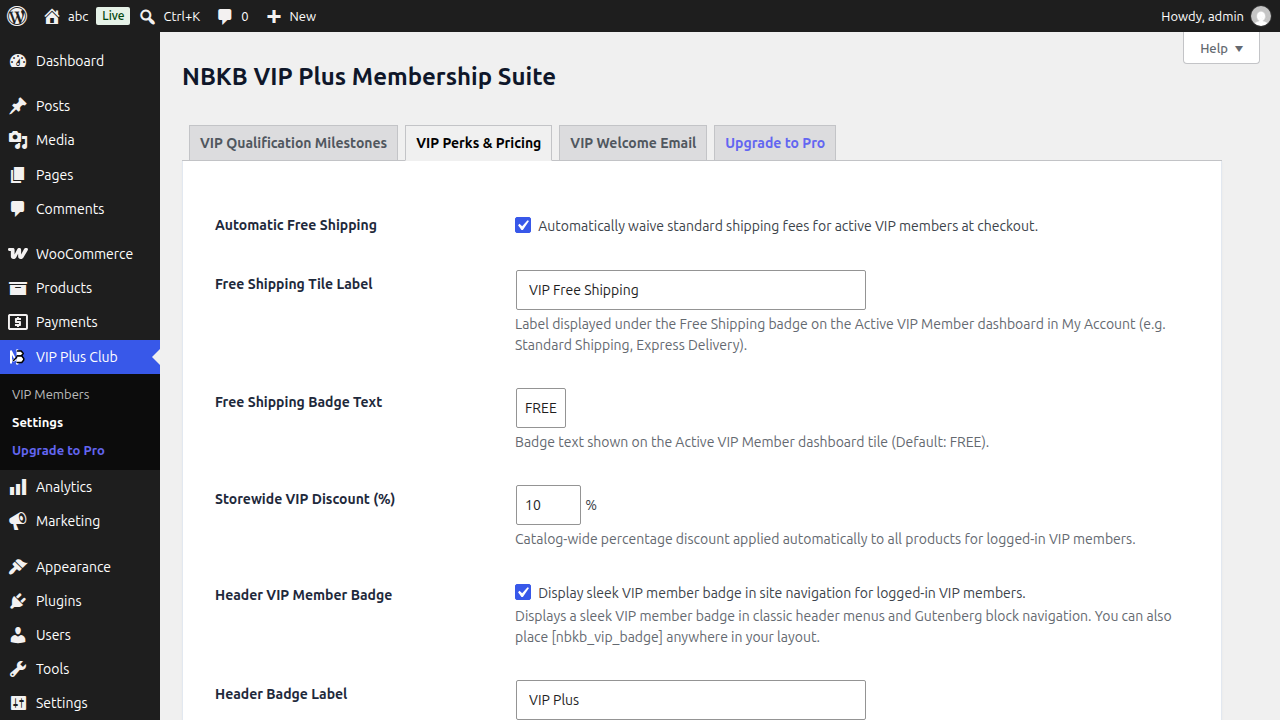
- Automatic Free Shipping: Toggle to automatically waive standard shipping rates at checkout down to
$0.00. The shipping rate displays a clean(VIP Free)tag. Zero coupon codes required. - Eligible Shipping Methods: Select which shipping methods qualify for free delivery (e.g., Flat Rate, Local Pickup) while excluding express overnight options.
- Storewide VIP % Discount: Set a global catalog discount (e.g.,
10%) applied automatically to all eligible products in cart and checkout. - Header Navigation VIP Badge: Displays an active member badge (e.g.,
VIP Member) in your site header navigation menus.
6. VIP Discounts & Exclusions
In addition to global storewide discounts, you can fine-tune pricing on a per-product level:
- Product-Specific VIP Price: Edit any product in WooCommerce. In the General pricing tab (or inside each variation for variable products), enter a dedicated VIP Member Price. If set, this fixed price overrides the storewide percentage discount.
- Disable VIP Plus Discount: Check this box on low-margin, clearance, or promotional items. VIP members will pay the regular retail price, protecting your margins.
- Dual Catalog Price Display: Non-members browsing your catalog see the regular retail price crossed out with a clear
VIP Member Ratebadge, giving them an immediate incentive to hit your qualification milestone.
7. Automated Celebration Emails
When a customer reaches your qualifying milestone, VIP Plus immediately dispatches an automated, transactional celebration email.
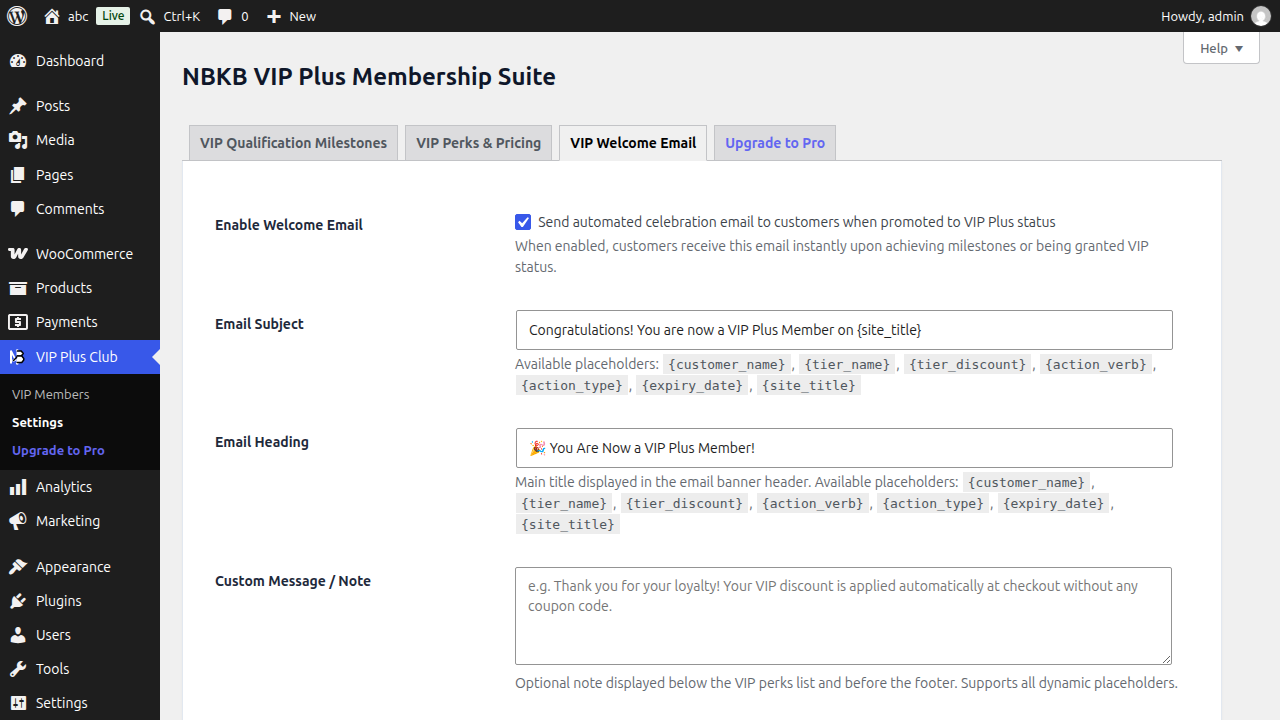
Configure the email under VIP Plus Club > Settings > VIP Welcome Email:
- Subject Line & Heading: Fully customizable with dynamic merge tags.
- Supported Dynamic Placeholders:
{customer_name}— Customer first name or display name.{discount_rate}— Active VIP percentage discount rate (e.g., 10%).{validity_days}— Active membership duration (e.g., 365 days).{site_title}— Your store name.{shop_url}— Link to your catalog.
- Live Preview: Instantly preview how the email renders with test data before dispatching to customers.
8. VIP Members Admin Hub
Manage all qualified and enrolled VIP members from VIP Plus Club > VIP Members:
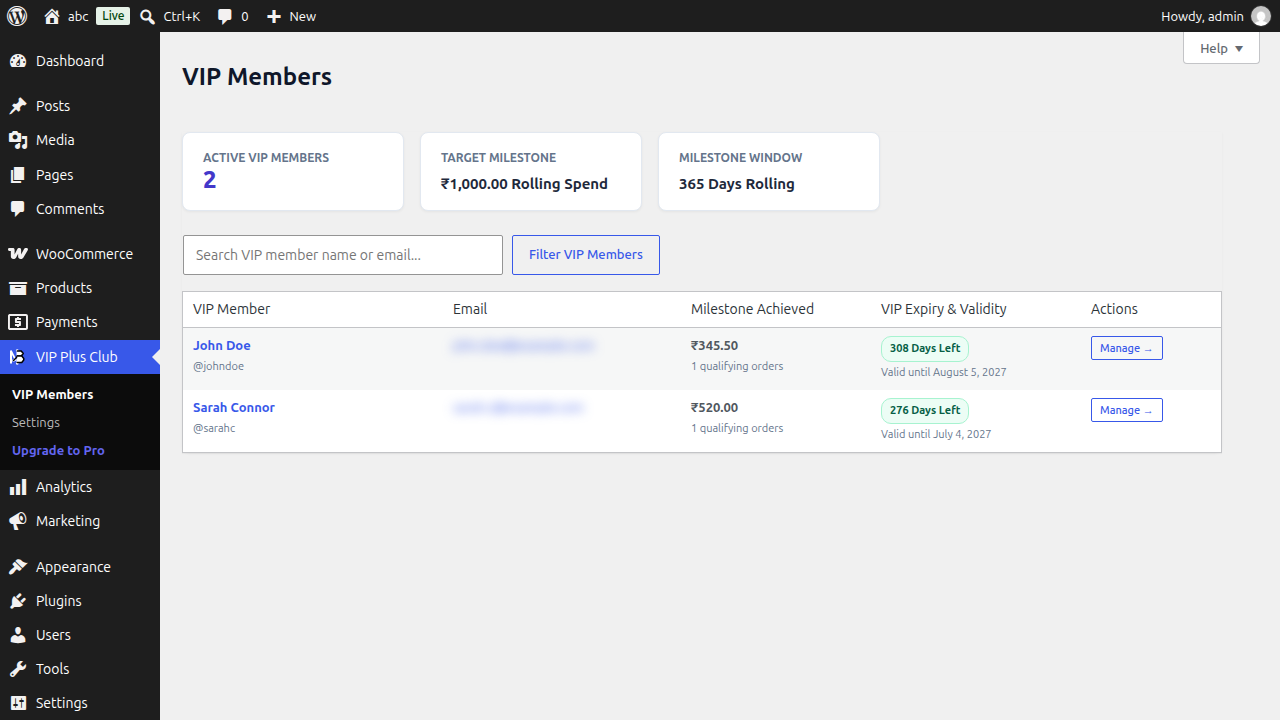
- Member Table Metrics: Real-time overview showing Customer Name, Email, VIP Tier Badge, Rolling 365-Day Spend, Total Completed Orders, Expiration Date, and Days Remaining.
- Manual Tier Assignment: Edit any WordPress user profile to manually grant, upgrade, or revoke VIP membership levels.
- Order Screen Status: Orders placed by active VIP members display a prominent status badge inside the WooCommerce Orders list and Single Order edit screen.
9. Multi-Tier VIP Ladder (Pro)
The Pro Add-on unlocks a scalable loyalty ladder under VIP Plus Club > Settings > Multi-Tier Ladder. Create progressive tiers that reward your highest-spending customers with escalating benefits:
- Silver Tier: Baseline milestone (e.g., $100 rolling spend → 5% storewide discount + free shipping).
- Gold Tier: Mid-tier milestone (e.g., $300 rolling spend → 10% discount + 1.5x coin multiplier).
- Platinum Tier: Elite milestone (e.g., $750 rolling spend → 15% discount + 2.0x coin multiplier + early drops access).
10. Loyalty Coins & Wallet (Pro)
Turn repeat orders into an engaging rewards loop under VIP Plus Club > Settings > Loyalty Coins:
- Coin Earning Rate: Define base coins earned per dollar/currency unit spent (e.g., 1 Coin per $1 spent).
- Tier Multipliers: Grant higher tiers earning accelerators (e.g., 1.5x for Gold, 2.0x for Platinum).
- Redemption Value: Set the monetary value per coin (e.g., 100 Coins = $5 discount).
- 1-Click Cart & Checkout Redemption: Active members can apply their coin balance directly on the Cart and Checkout pages as an instant order discount.
11. Paid VIP Pass Products (Pro)
Monetize VIP membership directly by selling digital VIP passes under VIP Plus Club > Settings > VIP Passes:
- Sell Pass Products: Link any WooCommerce simple or virtual product as a VIP Pass (e.g., Monthly VIP Pass for $9.99, Annual Pass for $79.99).
- Instant Activation: When an order containing a pass reaches Completed or Processing, the buyer is immediately upgraded to VIP status.
- Duration Stacking: If an active VIP member purchases another pass, the validity days are cleanly added to their existing expiration date.
- Refund Protection: If an order containing a pass is refunded, the granted VIP status and validity days are automatically revoked.
12. Early Access Drop Locker (Pro)
Create high-demand product launches exclusively for VIPs directly on the product edit screen under WooCommerce > Products > Edit Product > Product Data > Early Access:
- Early Access Window: Lock upcoming product releases so only active VIP members can view, add to cart, and purchase during the initial 24 or 48 hours.
- Live Digital Countdown: Non-members see an interactive countdown timer showing when the product unlocks for general public purchase.
- Server-Side Cart Protection: Direct URL cart injections (e.g.,
?add-to-cart=ID) are strictly blocked on the server, guaranteeing exclusivity.
13. Customer Loyalty Portal (My Account)
VIP Plus adds a dedicated VIP Plus Club endpoint to the WooCommerce My Account area:
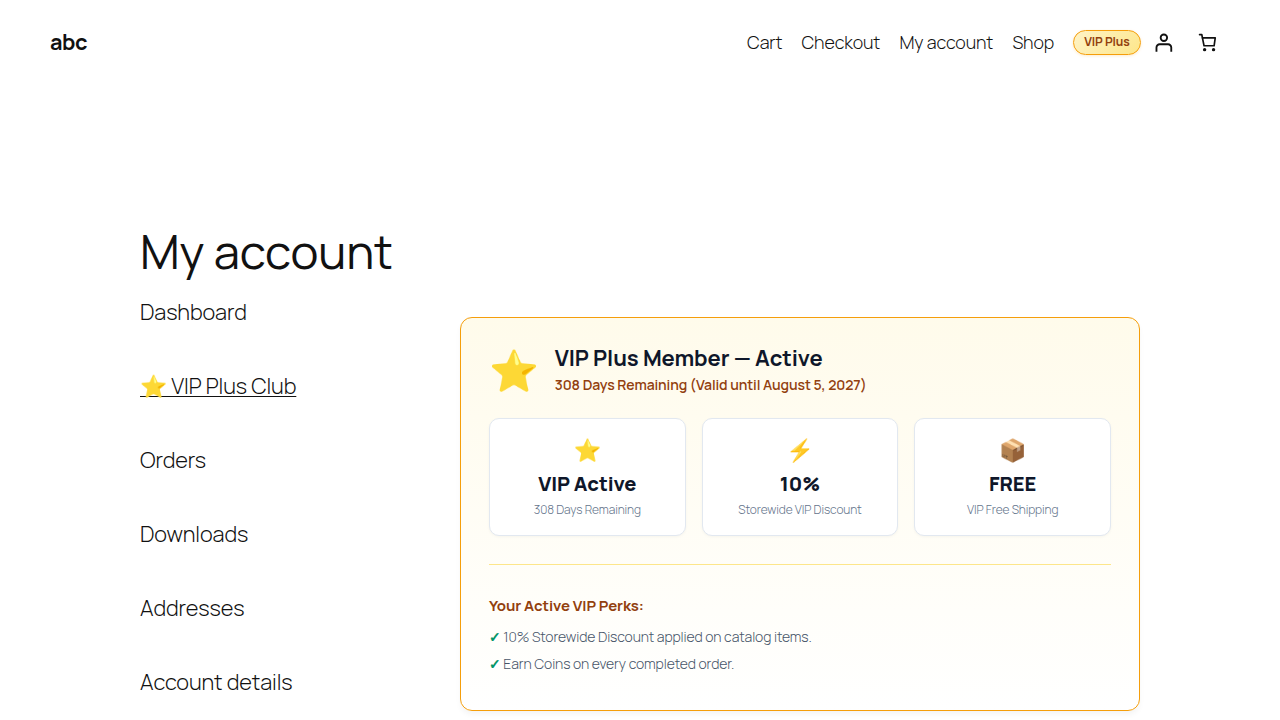
- Membership Status Tile: Displays active tier, remaining validity days, and auto-renewal countdown.
- Rolling Spend Progress Bar: Non-members and upgrading members see real-time progress toward their next milestone (e.g., Spend $45 more to unlock Gold).
- Active Perks Overview: Clear tiles highlighting Free Shipping, active % discounts, and coin balances.
14. Shortcodes & Navigation Badges
| Shortcode / Element | Description |
|---|---|
[nbkb_vip_badge] |
Renders the official VIP Member Crown badge anywhere on your store (header, sidebar, banners) linking to the customer’s My Account VIP loyalty portal. |
[nbkb_vip_crown_badge] |
Alias for [nbkb_vip_badge] with full backward compatibility. |
.nbkb-vip-nav-badge |
CSS class applied to header navigation menu items to highlight active VIP status. |
15. Troubleshooting & FAQ
16. Support & Helpdesk
Need technical help or have a feature suggestion? Our engineering team is here to assist you:
- Documentation Hub: https://nbkblabs.com/docs/
- Direct Support Desk: Submit a ticket via the contact form on our storefront support desk.
- Pro License Inquiries: Managed via your Freemius account dashboard.